9 to 18 Channels PHL Paperless Graphic Recorder
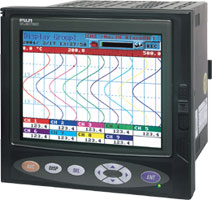
Fuji Electric Graphic Recorders (Paperless)
- 5.7" TFT colour screen
- 9 or 18 inputs, up to 30 data trends
- Free configuration software
- Easy to use, fast response
- Programmable Units and Inputs (RTD, T/c, mA, and Vdc)
- Internal Sampling time of 100ms
- Up to ten Logical inputs (event markers)
- Recording time from 1 to 32767 sec
- Normal, event or timed operation
- Average, minimum, maximum, instantaneous or peak value
- Storage of recorded data limited only by scan rate and 2Gb compact flash
- 2 alarms per channel with hysteresis and alarm delays as options
- 3 relay logic outputs (option) for alarm copy.
- Mathematical software module (option) with
- 6 counters /integrators,
- 1 to 6 mathematical functions and 6 logical functions.
- Friendly editing of functions in formula format for configuration complex mathematical functions
- 18 messages of 20 characters for configuration and can be displayed of internal or external events.
- Ethernet and Ftp server to access data via the web
- Communication Interfaces (option) RS485 - MODBUS®
- Configuration from the keys or via setup software
- Conversion of measurement data into spreadsheet formats
The main feature of the PHL Paperless Graphic Recorder is a 5.7" colour screen on which the measurement data are displayed vertically, as is the case with familiar chart recorders.
However, in contrast to conventional recorders, the PHL does not require a paper chart. Measurement data points are electronically stored and are available for evaluation both on site and on a PC.
The PHL can be equipped with 9 or 18 isolated measurement inputs, 6 counter/integrators, 6 mathematical and 6 logical channels. The instrument is programmable from the front panel or a PC .
 The above information should only be used as a guide.
For further information, please download our datasheet.
See also | A Low cost unit, especially suitable if you need 6 input or less.
| 
|
With a large 12" TFT colour screen, math
functions and a large amount of input (up to 36) this unit is ideal of demanding applications.
| 
| Check our complete range of paper chart recorders.
| 
|
|
|


